---
title: How to Add Photos to a Work Order In Your Vendor Portal
description: This part was a bit confusing, so we made a help article on the issue. Once clarified, it's very simple.
---
[Skip to content](https://know.movezen360.com/how-to-add-photos-to-a-work-order-in-your-vendor-portal#main-content)
[Create a Ticket](https://know.movezen360.com/kb-tickets/new?hsLang=en-us)

- [Home](https://movezen360.com/)
- [Customer Service Tickets](https://pages.movezen360.com/customer-central?status=all&view=my_tickets&offset=0)
Show submenu for Customer Service Tickets
- [Create a Service Request](https://pages.movezen360.com/customer-central/new)
- [Service Request History](https://pages.movezen360.com/customer-central?status=all&view=my_tickets&offset=0)
- [Knowledge Base](https://know.movezen360.com/)
- [Custom Services](https://pages.movezen360.com/custom-services)
- Portals
Show submenu for Portals
- [Help Portal Home](https://pages.movezen360.com/home)
- [Resident Maintenance & Finance Portal](https://movezen360.com/tenant-portal-login-center/)
- [Owner Property & Finance Portal](https://movezen360.com/rental-owner-portal/)
Open main navigation
Close main navigation
- [Home](https://movezen360.com/)
- [Customer Service Tickets](https://pages.movezen360.com/customer-central?status=all&view=my_tickets&offset=0)
Show submenu for Customer Service Tickets
- [Create a Service Request](https://pages.movezen360.com/customer-central/new)
- [Service Request History](https://pages.movezen360.com/customer-central?status=all&view=my_tickets&offset=0)
- [Knowledge Base](https://know.movezen360.com/)
- [Custom Services](https://pages.movezen360.com/custom-services)
- Portals
Show submenu for Portals
- [Help Portal Home](https://pages.movezen360.com/home)
- [Resident Maintenance & Finance Portal](https://movezen360.com/tenant-portal-login-center/)
- [Owner Property & Finance Portal](https://movezen360.com/rental-owner-portal/)
- [Create a Ticket](https://know.movezen360.com/kb-tickets/new)
How can we help you?
- There are no suggestions because the search field is empty.
1. [MoveZen Property Management Knowledge Base](https://know.movezen360.com/?hsLang=en-us)
2. [Vendor Resources](https://know.movezen360.com/vendor-resources?hsLang=en-us)
3. [Portal](https://know.movezen360.com/vendor-resources?hsLang=en-us#portal)
December 3, 2025
# How to Add Photos to a Work Order In Your Vendor Portal
## This part was a bit confusing, so we made a help article on the issue. Once clarified, it's very simple.
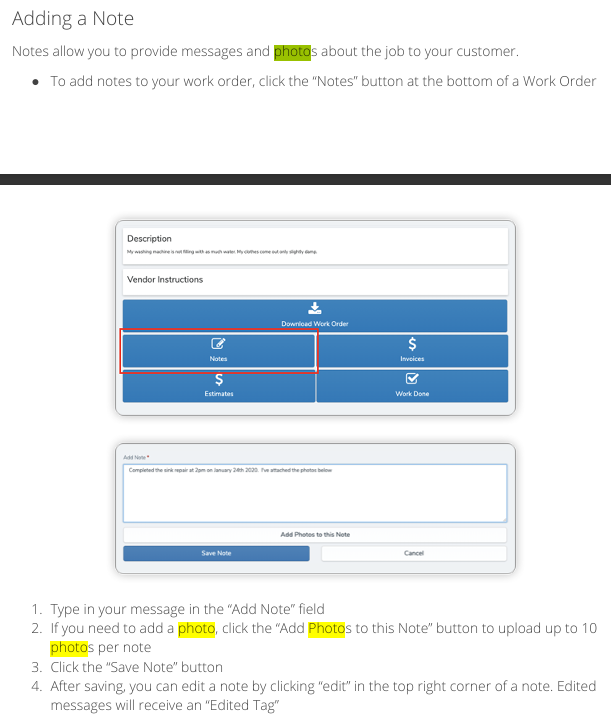
There is no add a photo option, you need to choose add a note, then there's a button to add up to 10 photos to each note. You can make more notes.
*Be sure to add photos prior to your invoice! Once the invoice is processed, the work order will be closed out and completed on our end and no other notes or photos will be able to be added.*
- [General](https://know.movezen360.com/general?hsLang=en-us#main-content)
- [Portals](https://know.movezen360.com/general?hsLang=en-us#portals)
- [Internal Article Only](https://know.movezen360.com/general?hsLang=en-us#internal-article-only)
- [Potential Residents](https://know.movezen360.com/potential-residents?hsLang=en-us#main-content)
- [Showing, Viewing, Accessing A Home For Rent](https://know.movezen360.com/potential-residents?hsLang=en-us#showing-viewing-accessing-a-home-for-rent)
- [Lease Signing and Negotiation, General Tips](https://know.movezen360.com/potential-residents?hsLang=en-us#lease-signing-and-negotiation-general-tips)
- [Application, Approval, Acceptance](https://know.movezen360.com/potential-residents?hsLang=en-us#application-approval-acceptance)
- [Move In Benefits and Costs](https://know.movezen360.com/potential-residents?hsLang=en-us#move-in-benefits-and-costs)
- [Upcoming Move In Residents](https://know.movezen360.com/upcoming-move-in-residents?hsLang=en-us#main-content)
- [Important Move In Payment Details](https://know.movezen360.com/upcoming-move-in-residents?hsLang=en-us#important-move-in-payment-details)
- [Current Residents](https://know.movezen360.com/current-residents?hsLang=en-us#main-content)
- [Payments](https://know.movezen360.com/current-residents?hsLang=en-us#payments)
- [General Lease Issues](https://know.movezen360.com/current-residents?hsLang=en-us#general-lease-issues)
- [Lease Renewals](https://know.movezen360.com/current-residents?hsLang=en-us#lease-renewals)
- [Lease Break, Roommate Swap, Lease Termination Options](https://know.movezen360.com/current-residents?hsLang=en-us#lease-break-roommate-swap-lease-termination-options)
- [Portal](https://know.movezen360.com/current-residents?hsLang=en-us#portal)
- [The Care We Take With Occupied Home Visits](https://know.movezen360.com/current-residents?hsLang=en-us#the-care-we-take-with-occupied-home-visits)
- [Resident Benefits Details](https://know.movezen360.com/current-residents?hsLang=en-us#resident-benefits-details)
- [Maintenance and Repairs](https://know.movezen360.com/current-residents?hsLang=en-us#maintenance-and-repairs)
- [Departing Residents](https://know.movezen360.com/departing-residents?hsLang=en-us#main-content)
- [Pre-Move Out](https://know.movezen360.com/departing-residents?hsLang=en-us#pre-move-out)
- [Move Out Day and Legal Finalization](https://know.movezen360.com/departing-residents?hsLang=en-us#move-out-day-and-legal-finalization)
- [Security Deposit Handling](https://know.movezen360.com/departing-residents?hsLang=en-us#security-deposit-handling)
- [Rental Investors and Market Information](https://know.movezen360.com/rental-investors-and-market-information?hsLang=en-us#main-content)
- [Seasonal and Timing](https://know.movezen360.com/rental-investors-and-market-information?hsLang=en-us#seasonal-and-timing)
- [Potential Homeowner Customer Pre-Signup](https://know.movezen360.com/potential-homeowner-customer-pre-signup?hsLang=en-us#main-content)
- [Onboard and Getting Started](https://know.movezen360.com/potential-homeowner-customer-pre-signup?hsLang=en-us#onboard-and-getting-started)
- [Portals](https://know.movezen360.com/potential-homeowner-customer-pre-signup?hsLang=en-us#portals)
- [Listing, Marketing, Vacant Handling](https://know.movezen360.com/potential-homeowner-customer-pre-signup?hsLang=en-us#listing-marketing-vacant-handling)
- [Management Service Offerings](https://know.movezen360.com/potential-homeowner-customer-pre-signup?hsLang=en-us#management-service-offerings)
- [Move Out Process Details for Owners](https://know.movezen360.com/potential-homeowner-customer-pre-signup?hsLang=en-us#move-out-process-details-for-owners)
- [Repairs and Maintenance](https://know.movezen360.com/potential-homeowner-customer-pre-signup?hsLang=en-us#repairs-and-maintenance)
- [Charges and Costs](https://know.movezen360.com/potential-homeowner-customer-pre-signup?hsLang=en-us#charges-and-costs)
- [Setting Listing Rental Rates](https://know.movezen360.com/potential-homeowner-customer-pre-signup?hsLang=en-us#setting-listing-rental-rates)
- [Accounting, Billing, Payments](https://know.movezen360.com/potential-homeowner-customer-pre-signup?hsLang=en-us#accounting-billing-payments)
- [Current MoveZen Rental Homeowners](https://know.movezen360.com/current-movezen-rental-homeowners?hsLang=en-us#main-content)
- [Owner Resources](https://know.movezen360.com/current-movezen-rental-homeowners?hsLang=en-us#owner-resources)
- [Taxes and Collections](https://know.movezen360.com/current-movezen-rental-homeowners?hsLang=en-us#taxes-and-collections)
- [Between Lease Turnover and Relist](https://know.movezen360.com/current-movezen-rental-homeowners?hsLang=en-us#between-lease-turnover-and-relist)
- [Move Out Process and Preparation](https://know.movezen360.com/current-movezen-rental-homeowners?hsLang=en-us#move-out-process-and-preparation)
- [Payments and Funding](https://know.movezen360.com/current-movezen-rental-homeowners?hsLang=en-us#payments-and-funding)
- [Portals, Statements, Financials](https://know.movezen360.com/current-movezen-rental-homeowners?hsLang=en-us#portals-statements-financials)
- [Lease Renewals](https://know.movezen360.com/current-movezen-rental-homeowners?hsLang=en-us#lease-renewals)
- [Listing, Showing, Vacancy Handling](https://know.movezen360.com/current-movezen-rental-homeowners?hsLang=en-us#listing-showing-vacancy-handling)
- [Lease Break, Roommate Swap, Lease Termination Options](https://know.movezen360.com/current-movezen-rental-homeowners?hsLang=en-us#lease-break-roommate-swap-lease-termination-options)
- [Vendor Resources](https://know.movezen360.com/vendor-resources?hsLang=en-us#main-content)
- [Portal](https://know.movezen360.com/vendor-resources?hsLang=en-us#portal)
- [Potential Vendor Relationship](https://know.movezen360.com/vendor-resources?hsLang=en-us#potential-vendor-relationship)
- [Repairs & Maintenance](https://know.movezen360.com/repairs-maintenance?hsLang=en-us#main-content)
- [Reporting](https://know.movezen360.com/repairs-maintenance?hsLang=en-us#reporting)
- [Improvement Tips](https://know.movezen360.com/repairs-maintenance?hsLang=en-us#improvement-tips)
- [Common Problems](https://know.movezen360.com/repairs-maintenance?hsLang=en-us#common-problems)
- [Fire and Carbon Monoxide](https://know.movezen360.com/repairs-maintenance?hsLang=en-us#fire-and-carbon-monoxide)
- [Emergencies](https://know.movezen360.com/repairs-maintenance?hsLang=en-us#emergencies)
- [Staffing and Hiring Details](https://know.movezen360.com/staffing-and-hiring-details?hsLang=en-us)
- [Potential MoveZen Homeowner Customers](https://know.movezen360.com/potential-movezen-homeowner-customers?hsLang=en-us)
- [Listing, Showing, Viewing, Marketing for Rentals](https://know.movezen360.com/listing-showing-viewing-marketing-for-rentals?hsLang=en-us#main-content)
- [Rental Showings](https://know.movezen360.com/listing-showing-viewing-marketing-for-rentals?hsLang=en-us#rental-showings)
- [Move In and Preparation](https://know.movezen360.com/move-in-and-preparation?hsLang=en-us)
- [Move Out & Lease Finalization](https://know.movezen360.com/move-out-lease-finalization?hsLang=en-us)
- [Lease Renewals](https://know.movezen360.com/lease-renewals?hsLang=en-us)
[](https://MoveZen360.com)
[mailto:Service@MoveZen360.com](mailto:Service@MoveZen360.com)
Copyright © 2025, MoveZen Property Management